Mp3 Editor (ARM)1.2
Publisher Description
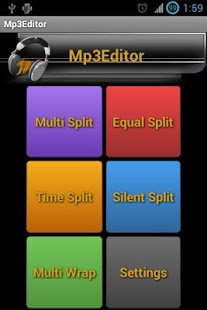
Mp3 Editor (ARM) is an advanced mp3 editor tool which enables the user to cut and join Mp3 and Ogg-vorbis files. The following are the features supported by Mp3 Editor.
1. Splits Mp3 Files based on selected split points
2. Splits Ogg-vorbis files based on selected split points
3. Splits mp3 files into given number of equal parts
4. Splits mp3 files into equal parts based on the given time length
5. Split based on auto silence detection with silence configuration and option to remove silence
6. Joins selected mp3 files into a single file.
7. Set the split files as the Mobile ringtone
8. Set the joined file as the Mobile ringtone
9. Overlap split points by the configured time interval
10. Built in Mp3 Player to play the selected audio track
This is the one and only free application in the Play Store with these many unique features.
Please mail your comments and suggestions to varzeon@gmail.com. If it is found useful and viable, the feature will be added in the next release of Mp3 Editor.
About Mp3 Editor (ARM)
The company that develops Mp3 Editor (ARM) is Anandaraman Vithyananthan. The latest version released by its developer is 1.2. This app was rated by 1 users of our site and has an average rating of 5.0.
To install Mp3 Editor (ARM) on your Android device, just click the green Continue To App button above to start the installation process. The app is listed on our website since 2013-03-30 and was downloaded 29 times. We have already checked if the download link is safe, however for your own protection we recommend that you scan the downloaded app with your antivirus. Your antivirus may detect the Mp3 Editor (ARM) as malware as malware if the download link to com.varzeon.mp3editor is broken.
How to install Mp3 Editor (ARM) on your Android device:
- Click on the Continue To App button on our website. This will redirect you to Google Play.
- Once the Mp3 Editor (ARM) is shown in the Google Play listing of your Android device, you can start its download and installation. Tap on the Install button located below the search bar and to the right of the app icon.
- A pop-up window with the permissions required by Mp3 Editor (ARM) will be shown. Click on Accept to continue the process.
- Mp3 Editor (ARM) will be downloaded onto your device, displaying a progress. Once the download completes, the installation will start and you'll get a notification after the installation is finished.
Program Details
System requirements
Download information
Pricing
Version History
version 1.2
posted on 2013-03-30
$ File Explorer crash and related bugs,$ Boot Animation,$ Help Screen scaling issue,$ Fixed mode selection from options menu,$ Fixed critical music player bug
version 1.2
posted on 2013-03-30
Several fixes and updates
